

Vishal
Nov 15, 2024
How to install PHP on Windows
How to install PHP on Windows
Understanding Windows
Windows OS is a Microsoft Corporation operating system, used by millions of people all over the world, it played an important role in personal computing until its initial release in 1985. Windows is known for being easy to use, its graphical user interface (GUI), and catches both types of person personal and professional needs.
Evolution of Windows OS
Windows took decades to evolve. in its first release (v-1.0) it introduced a rudimentary GUI that allows users to perform basic tasks like text processor and paint. Versions 3.0 and 3.1 present more crazy things like an improved file management system and support for some more complex software
Windows 95 was a game changer for Windows because it introduced the Taskbar, and Start menu, and improved plug-nad-play capability. This version presents lots of features which still is in the present advanced version of Windows. Windows XP, released in 2001 improved user experience with a more stable and user-interface interface, making it one of the best versions of Windows history.
Modern Windows OS Versions
Windows 7 released in 2009 also gained massive popularity because of its relativity operating systems stability and user-friendly features. Windows 8 introduced in 2012 was partially successful due to a new and different Metro UI, which is designed for touch computing. To untangle these concerns Microsoft advanced the Windows 8. 7 that restored the Start button while enhancing the general utilization experience of the users.
Windows 10 which was released in the year 2015 is a blend of the favorable characteristics of all the Windows versions. It provided the Start menu like in Windows 7 the virtual desktops feature and the Edge browser also.
Key Features and Functionality
Another interesting field is Windows OS which is characterized by the availability of numerous options that can meet the requirements of different types of users. The Start menu contains shortcuts to the applications and the most commonly used settings and files. The panel with shortcuts for all the opened programs and the bar that contains system notifications and statuses is the taskbar.
Windows file management is done with the help of File Explorer where users can sort, search, and operate files and folders. The OS also allows for application processing and several applications to be run at the same instance.
In terms of security, Windows OS has always been considered to be delicate. Security features including Windows Defender, BitLocker, occasional security updates, and Windows Firewall assist in preventing malware, viruses, and other cyber threats. Also, biometric authentication is provided with the help of Windows Hello so users have more security for both private and office needs.
Integration and Compatibility
Windows OS is famous for its support of virtually all the software and hardware in the market. Most programs can be run on it, be it office programs such as Microsoft Suite, graphics programs including Adobe Photoshop, and video editors like Adobe Premiere Pro and DaVinci Resolve. This compatibility of running a large number of applications on it makes Windows more suitable for use by everybody including a home user, a businessman, and even a student.
The OS also has form-factor integration with Microsoft’s services such as OneDrive for cloud storage, Microsoft Teams for collaboration, and the Microsoft Store for apps and games. Also, Windows 10, and Windows 11 have improved compatibility with Android and iPhone devices, making the overall experience smoother and more blended.
Conclusion
Microsoft Windows is undeniably one of the most popular operating systems for computers used in households and businesses for years. Constant development, friendly GUI, high level of protection against viruses, and moderating compatibility with other programs and devices make it a leader in the operating systems market. In the given scenario, as the technological world is continually evolving, and Microsoft is benefitting from its evolution, Windows OS has all the dynamics and potential for users all over the world.
About PHP
Introduction
The Formal name is PHP: Hypertext Preprocessor is a web scripting language that creates the application's interface with databases and it can be combined with HTML. Rubber was developed in 1994 by Rasmus Lerdorf and is widely used for developing web applications. PHP scripts execute on the server and anything that is produced by the PHP script for the web server is presented to the browser in HTML.
Features
Some features can be exclusive in PHP; one of those is its relative simplicity. This language is relatively simple for beginner developers, but it also provides a rather complex set of tools for professionals. PHP has been designed in C language syntax and is a mix of C, Java, and Perl hence, it is familiar to people with knowledge of the mentioned languages. Also, PHP is fully expandable and can be processed directly and placed in the HTML code which makes it possible to develop dynamic websites in a short period.
PHP can be operated under Windows, Linux, Unix, and Mac OS and this makes it to be very flexible. These databases rely on it and include MySQL, PostgreSQL, Oracle, Sybase, Informix, and MS SQL Server. This versatility makes PHP ideal to be used by web developers who are required to interact with various types of databases.
Another thing that can be mentioned as the key benefit of using PHP is a close-knit community of developers. There is a large range of frameworks and libraries created by the PHP community that improve the capabilities of PHP for creating complicated applications. Laravel, Symfony, CodeIgniter, etc are some of the PHP frameworks that have an organized and scalable structure with well-devised MVC modeling that helps in achieving the different parts of the application and its presentation. This separation makes it easier to handle and grow applications too.
The area of security always plays an important role in web development and PHP language has implemented security principles. It has built-in capabilities to assist programmers in writing secure code; these are sanitization functions, encryption libraries, and methods of handling secure sessions. However, it is essential for developers to follow best practices and stay updated with the latest security patches to ensure their applications remain secure.
Performance is another advantage for which PHP is often preferred over the competitors. It is lightweight and thus ideal for high-traffic websites. In PHP7 performance improvements were achieved, such as a new Zend engine that can successfully and faster run through the PHP code. With PHP 7 there have been enhancements in the way PHP handles requests per second, the general use of less memory, and the overall performance.
Another defining quality of PHP is the profound documentation. The official PHP manual is recommended for reading as it is detailed and also contains numerous examples that will make it easy for developers to implement PHP’s capacities. Also, numerous PHP tutorials, guides, and forums have been developed by the PHP community to be useful to both the starter and the advanced PHP developers.
Still, it has to be mentioned that PHP is not devoid of criticism despite all of the benefits it offers. Other developers advocate for strong opinions towards PHP saying that PHP codes are very easy to write and since they are in a large quantity, they can be written anyhow and contain a lot of flaws and insecurity. Still, through the examples of the best practices and utilization of modern frameworks, the developers can control these risks and create high-quality, secure projects.
Therefore, PHP is a flexible and quite effective script language, which acts as the main basis of web development. As a result of these characteristics, it is highly recommended for developers of different levels since it is easy to use and install and also has rich support from the community with comprehensive documentation. From the generic LAMP configuration to custom private scripts, PHP is the language to meet a microblog or a huge commercial site’s need for dynamic and engaging web services.
PHP Installing Process
Step 1:
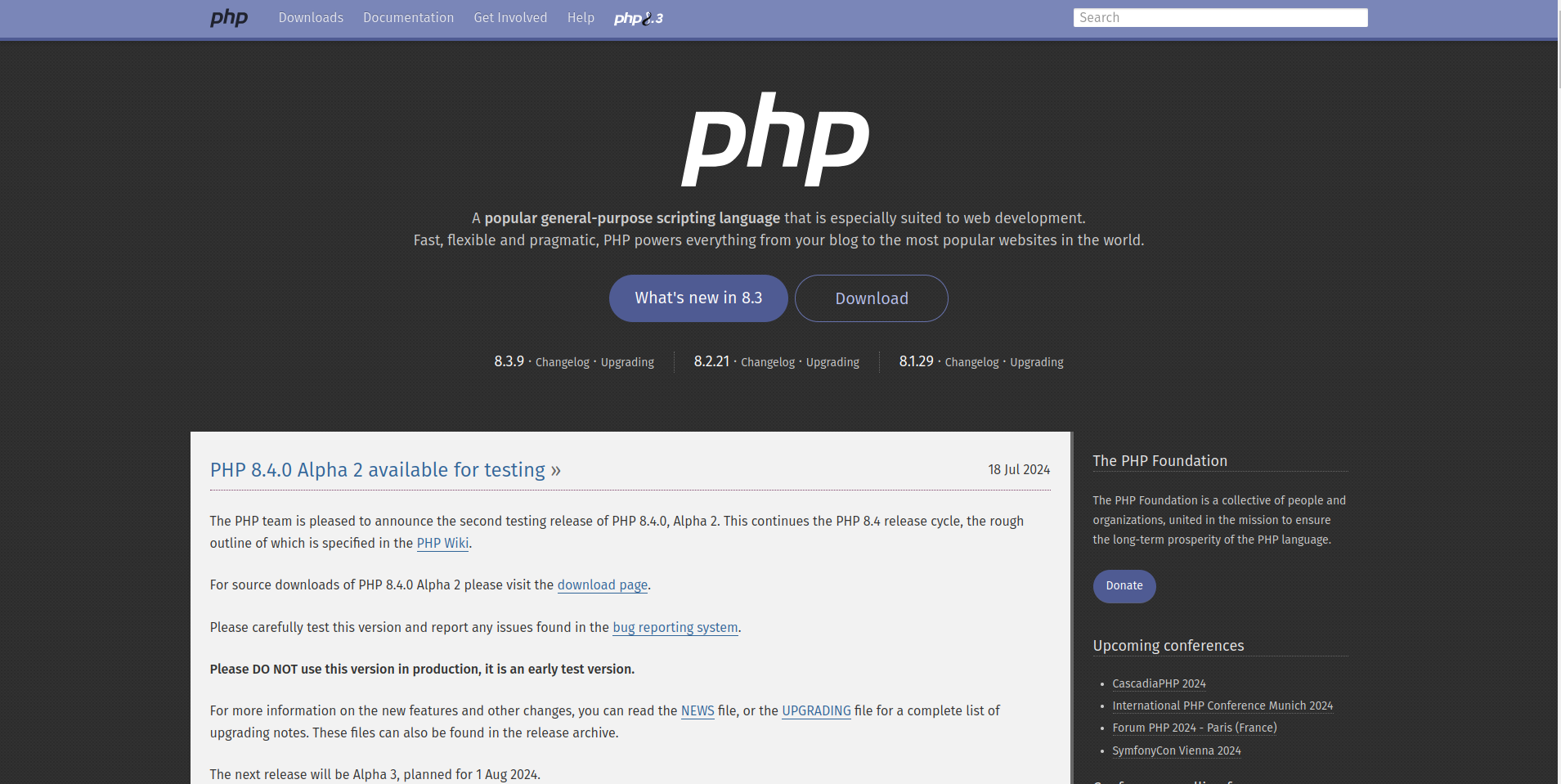
Very first, go to the PHP official website from here and a page will be open in front of you.
Step 2:
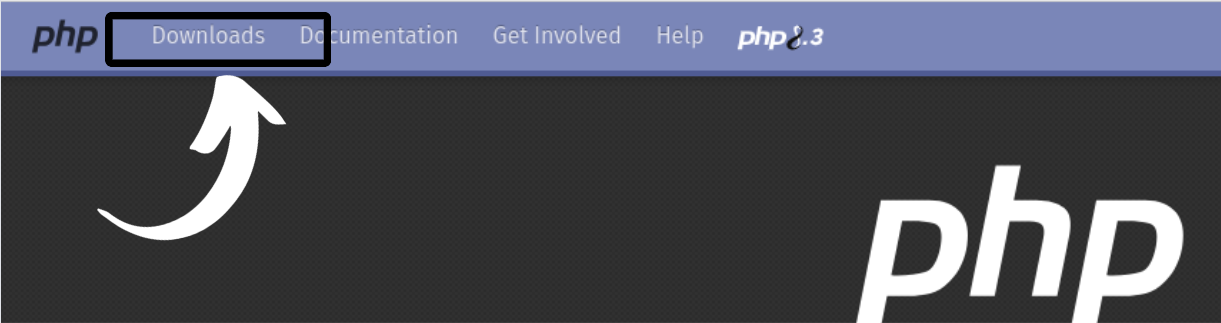
After that Download Button which is located in Navbar.
Step 3:
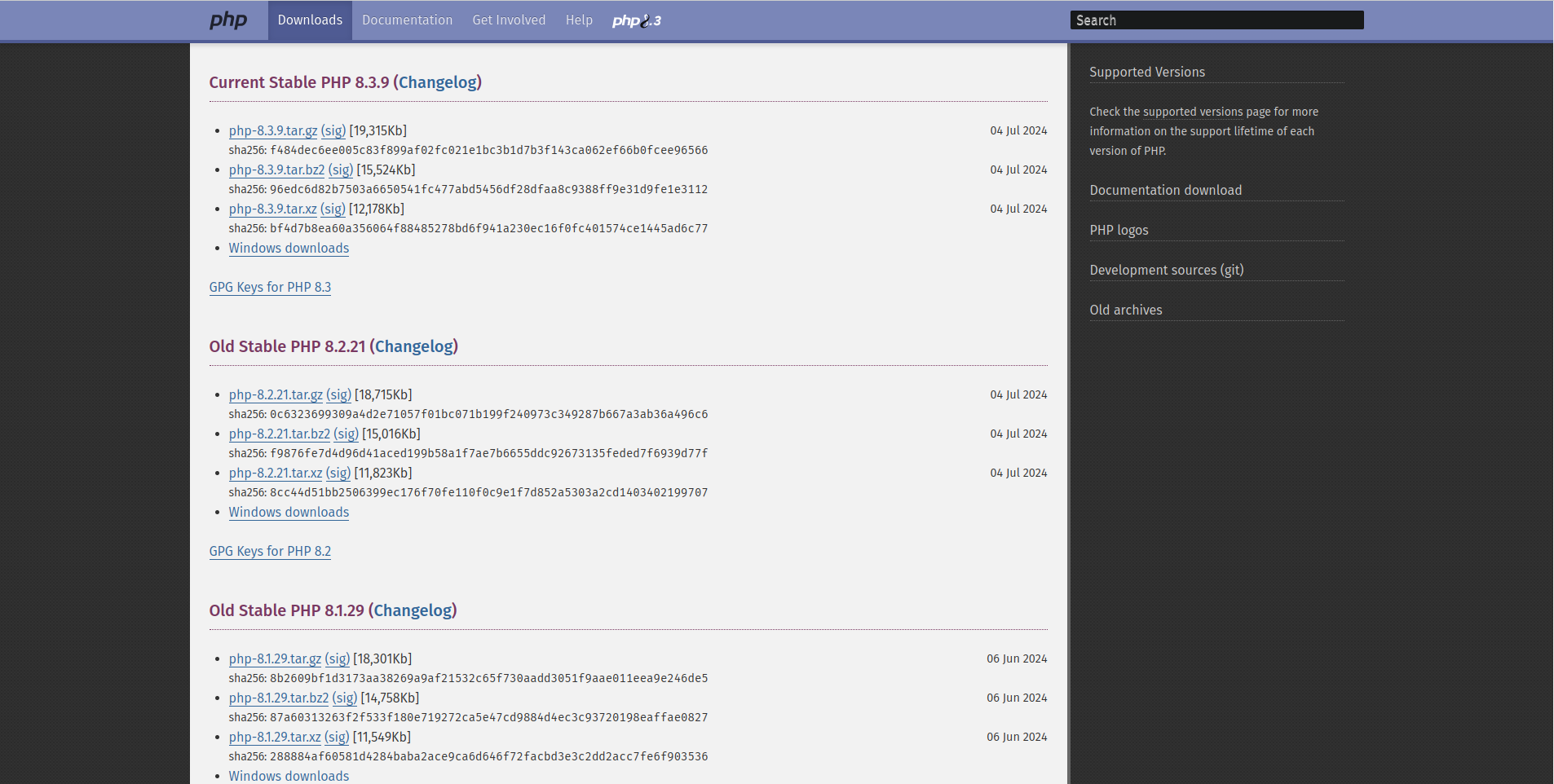
After clicking that a new page will open.
Step 4:
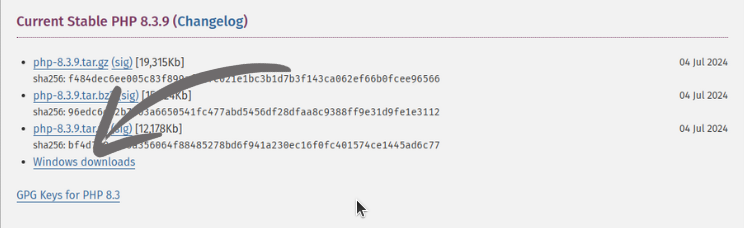
Just click on Windows downloads in the Current Stable version.
Step 5:
You will redirected to a new page where all the latest PHP versions will be available
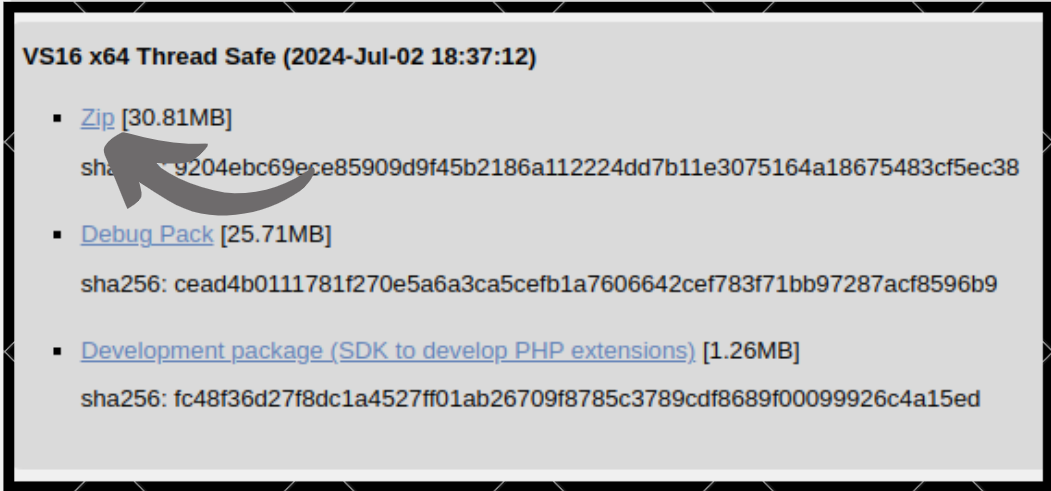
Remember to download Thread Safe only don't download Non-Thread Safe
Step 6:
Click on zip to start downloading.
Step 7:
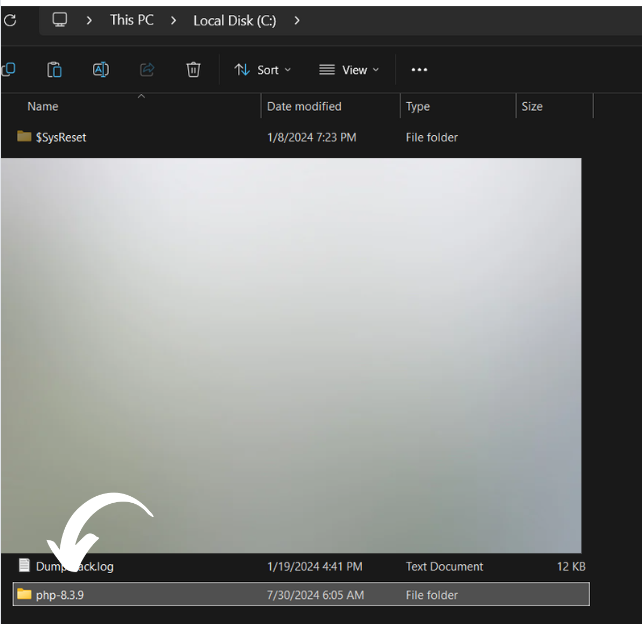
A zip file will be installed on your system, so extract it and move it to Your C directory.
Step 8:
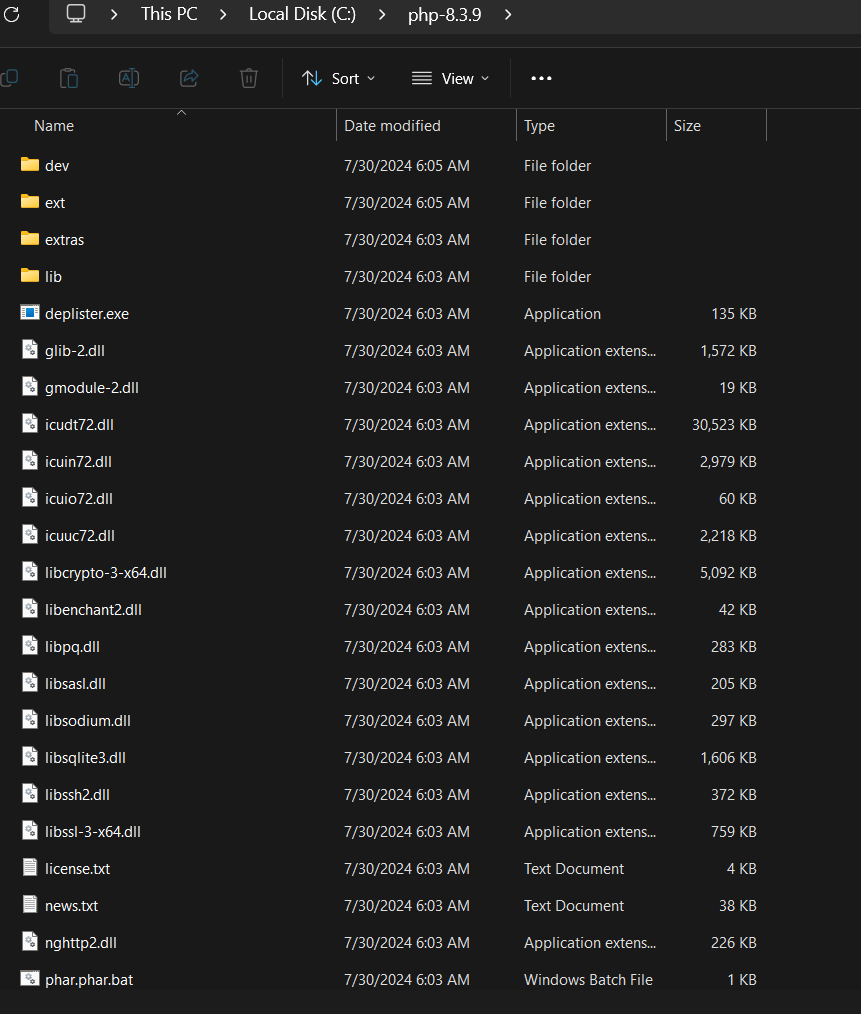
Then, open your folder and copy the path.
Step 9:
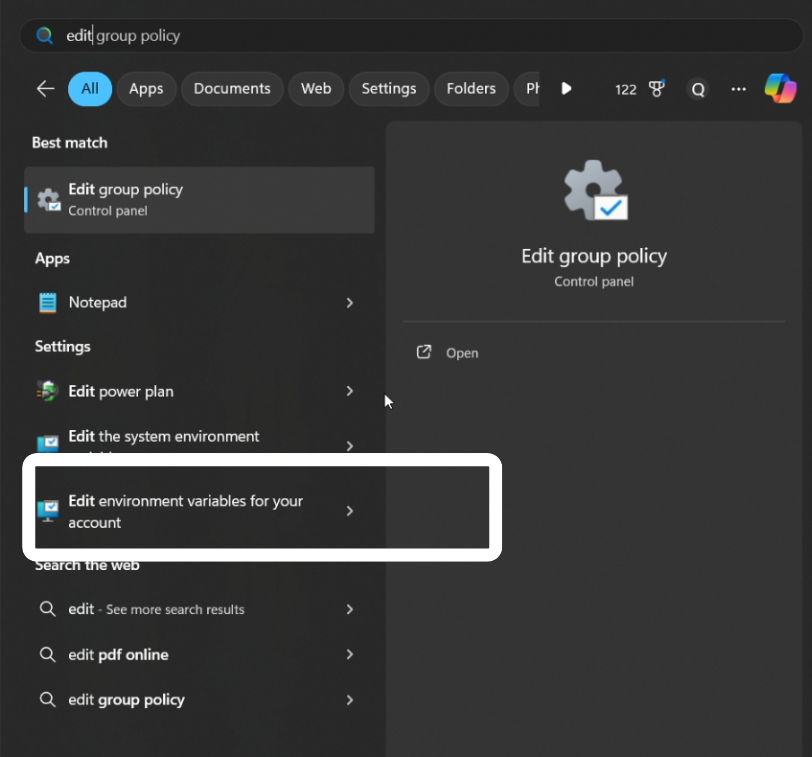
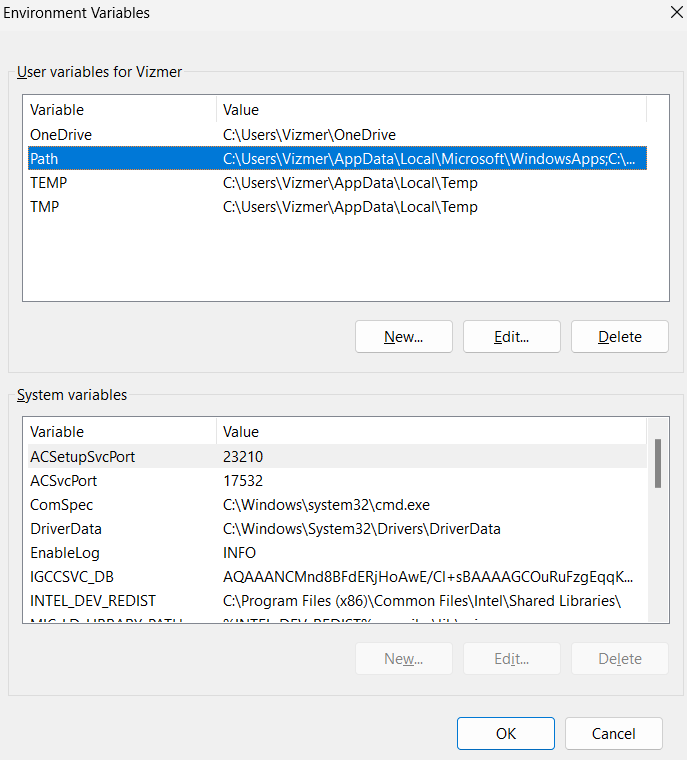
And open edit environment variables for your account.
Step 10:
A pop-up will open that will look like this.
Step 11:
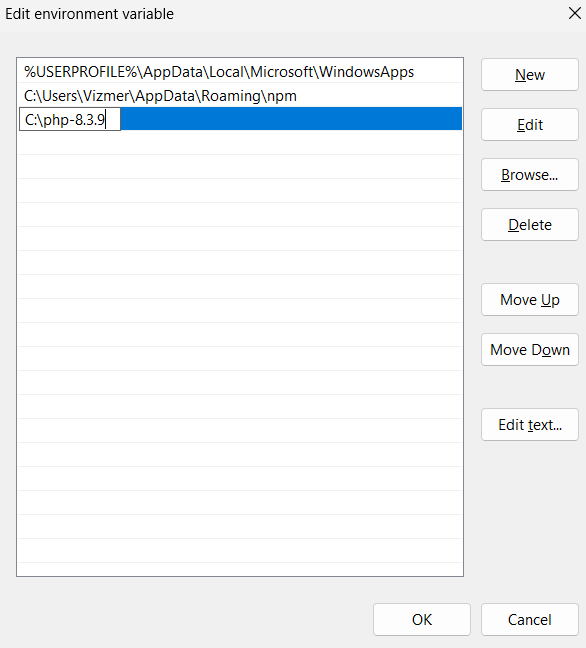
Click on Edit button.
A pop will appear simply paste your path there.
Step 12:
Then click OK and everything is done.
Verify
To verify, Is PHP successfully installed or not run this Command on your terminal.
php -v
The PHP version will be return.