

Vishal
Nov 15, 2024
How to install Composer on Window
How to install Composer on Window
Windows Introduction
Windows OS is a Microsoft Corporation operating system, used by millions of people all over the world, it played an important role in personal computing until its initial release in 1985. Windows is known for being easy to use, its graphical user interface (GUI), and catches both types of person personal and professional needs.
Evolution of Windows OS
Windows took decades to evolve. In its first release (v-1.0) it introduced a rudimentary GUI that allows users to perform basic tasks like text processor and paint. In Versions 3.0 and 3.1 it's present more crazy things like an improved file management system and support for some more complex software
Windows 95 was a game changer for Windows because it introduced the Taskbar, Start menu, and improved plug-and-play capability. This version presents lots of features which still are in the present advanced version of Windows. Windows XP, released in 2001 improved user experience with a more stable and user-interface interface, making it one of the best versions in Windows history.
Modern Windows OS Versions
Windows 7 released in 2009 also gained massive popularity because of its relativity operating systems stability and user-friendly features. Windows 8 introduced in 2012 was partially successful due to a new and different Metro UI, which is designed for touch computing. To untangle these concerns, Microsoft advanced the Windows 8. 7 that restored the Start button while enhancing the general utilization experience of the users.
Windows 10 which was released in the year 2015 is a blend of the favorable characteristics of all the windows versions. It provided the Start menu like in Windows 7 and the virtual desktops feature and the Edge browser also.
Key Features and Functionality
Another interesting field is Windows OS, which is characterized by the availability of numerous options that can meet the requirements of different types of users. The Start menu contains shortcuts to the applications and the most commonly used settings and files. The panel with shortcuts for all the opened programs and the bar that contains system notifications and statuses is the taskbar.
Windows file management is done with the help of File Explorer where users can sort, search, and operate files and folders. The OS also allows for application processing and several applications to be run at the same instance.
In terms of security, Windows OS has always been considered to be delicate. Security features including Windows Defender, BitLocker, occasional security updates, and Windows Firewall assist in preventing malware, viruses, and other cyber threats. Also, biometric authentication is provided with the help of Windows Hello, so users have more security for both private and office needs.
Integration and Compatibility
Windows OS is famous for its support of virtually all the software and hardware in the market. Most programs can be run on it, be it office programs such as Microsoft Suite, graphics programs including Adobe Photoshop, and video editors like Adobe Premiere Pro and da Vinci Resolve. This compatibility of running many applications on it makes Windows more suitable for use by everybody, including a home user, a businessman, and even a student.
The OS also has form-factor integration with Microsoft’s services such as OneDrive for cloud storage, Microsoft Teams for collaboration, and the Microsoft Store for apps and games. Also, Windows 10, and Windows 11 have improved compatibility with Android and iPhone devices, making the overall experience smoother and more blended.
Conclusion
Microsoft Windows is undeniably one of the most popular operating systems for computers used in households and businesses for years. Constant development, friendly GUI, high level of protection against viruses, and moderating compatibility with other programs and devices make it a leader in the operating systems market. In the given scenario, as the technological world is continually evolving, and Microsoft is benefitting from its evolution, Windows OS has all the dynamics and potential for users all over the world.
Understanding Composer
Composer is a package manager that is used for PHP language, which is a popular programming language, largely used in development of web applications. Launched at http://google.com/2012 by Nils Adermann and Jordi Boggiano, Composer is a tool that has improved the way PHP developers include libraries and packages in their projects.
Key Features
As has already been mentioned, the basic usage of Composer is to manage dependencies in PHP applications. This means it enables a developer to declare the libraries on which the project depends and then handles the process of getting (installing), upgrading, or even uninstalling those libraries. Specifically, the participant referred to a file called composer as the type of file a composer creates. json to define the dependencies and versions that are needed for the particular project. Whenever a developer types the composer install or composer update command, the composer reads it, fetches the packages indicated in the file from the package central repository, and deploys them in the project.
How It Works
Composer acts at the project level and not at the global level so that each project can have its structure of dependencies and versions without interference. This can be particularly helpful provided that there are variations in the numerous extents projects that call for different libraries. In realizing the vendor's directory within the project, Composer locks out the dependencies, thus dealing with the issue of version conflicts and streamlining of the management of dependencies.
Benefits
Another appealing factor that the users of Composer can benefit from is that it is quite efficient in handling intricate dependency relationships. It can fix and install libraries and their dependent ones with no intervention from the developers itself, bringing a lot of convenience to the developers. Moreover, Composer can provide autoload support that considers classes that are in the included libraries, which makes the development easier.
Impact on PHP Development
Nowadays, Composer has become one of the basic PHP tools since its appearance. It has become a standard way for PHP developers to handle the project dependencies, to easily include third-party libraries, and to share code. Due to this, there are fewer monolithic PHP apps and more maintainable ones because many packages can be acquired easily from Packagist without the tension of dependency solving.
Composer Installation Process
Step 1: Open Composer's official site

Step 2: Click on the Download Button

Step 3: Click On Composer-setup.exe
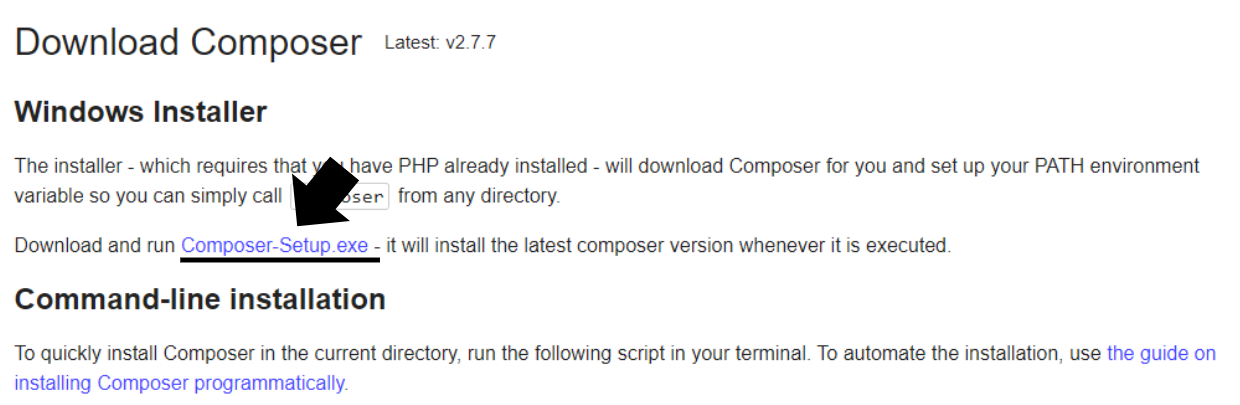
After Clicking here, a file will be downloaded on your pc
Step 4: Open your file manager and double-click on Composer-setup.exe and install it.