

Vishal
Nov 15, 2024
How to change root user password in MySQL
How to change root user password in MySQL
Introduction
In this tutorial, we will change the password of root user in MySQL.
About MySQL
MySQL is a common open source RDBMS which is now one of the largest – used databases in the world. It was originally developed in 1995 by MySQL AB of Sweden and then acquired by Sun Microsystems in 2008 and then by Oracle Corporation in 2010. As earlier indicated, MySQL has become popular in database management due to its performance, reliability, and usability in all over the world.
Key Features and Architecture
MySQL is a client-server database model based on that. The MySQL server is arguably the most important component of this system since it processes all the instructions that are directed towards the database, while simultaneously making sure that the integrity of the database is not violated. Users access the server to retrieve the data, modify it, or perform other functions on the data. MySQL employs SQL as its command language which is a special language used to manage relational databases.
MySQL also has a large number of storage engines, for example InnoDB, MyISAM and others thanks to which it creates attention. InnoDB, the default storage engine of MySQL, provides fully implemented, bytes-near-ACID transaction support for data modification transactions needed to support a class of applications needing high reliability. MyISAN, on the other hand, is very fast, and convenient enough for read-only workload where transaction is not necessary.
MySQL also has reproduction, that is, copying of data from one MySQL sever to another with intention of data replication and distribution of workload. This feature will be of most importance in distributed systems where availability is immensely important. Besides, in MySQL table partitioning entails dividing a large table into several parts making it contribute to optimizing the query.
About root
In Ubuntu as other Linux based operating systems, the root user is the super user which has full privileges. This user has the highest level of privilege since they are able to do anything to the system and perform all actions that normal users cannot, for instance, install or delete some software or modify files and settings that will impact all the users of the system.
Key Characteristics of the Root User:
Unlimited Privileges: Being the system administrator, the root user has total control and floods can perform any command. This involves adding, creating or deleting of key system data needed in the operation of the system, which if executed errantly, might lead to system failure.
Security Risks: Due to the immense control the root user has, using root account is often dangerous. One more disadvantage is that, when using terminal and being logged in as root, the mistake can lead to great consequences. That is why direct root access is turned off or limited on Ubuntu and other distributions.
Sudo Command: In Ubuntu Linux, there is no direct login as root administer but when someone needs to do privileged operations, they need to run sudo. sudo is an abbreviation of ‘superuser do’ this is a utility that permits a particular user to provide the command as superuser or any other user for some reason under the security policy. For their example, the command; sudo apt-get update updates the system’s package lists as the root user.
Root Directory: The home directory of the root user is the /root, which is quite different from /, which refers to the root of the files system. To begin with, the root directory or (/) is the main directory over the trees containing all the directories in the filesystem.
How to change root password (Ubuntu)
Step 1. Open MySQL
Very first, open your terminal using Ctrl+alt+t keys and then run this command to open MySQL
sudo mysql
Change Password
run this command to change password
ALTER USER 'root'@'localhost' IDENTIFIED BY 'NewPassword';
Step 3. flush privileges
After this you are done, just flush the privileges
FLUSH PRIVILEGES;
Step 4. Exit
exit
How to change root password (Windows)
These steps are performed in Windows 11, so this tutorial will work even you are using latest version of windows
Understanding Windows
Windows OS is a Microsoft Corporation operating system, used by millions of people all over the world, it played an important role in personal computing until its initial release in 1985. Windows is known for being easy to use, its graphical user interface (GUI), and catches both types of person personal and professional needs.
Evolution of Windows OS
Windows took decades to evolve. In its first release (v-1.0) it introduced a rudimentary GUI that allows users to perform basic tasks like text processor and paint. Versions 3.0 and 3.1 present more crazy things like an improved file management system and support for some more complex software
Windows 95 was a game changer for Windows because it introduced the Taskbar, and Start menu, and improved plug-amd-play capability. This version presents lots of features which still are in the present advanced version of Windows. Windows XP, released in 2001 improved user experience with a more stable and user-interface interface, making it one of the best versions in Windows history.
Modern Windows OS Versions
Windows 7 released in 2009 also gained massive popularity because of its relativity operating systems stability and user-friendly features. Windows 8 introduced in 2012 was partially successful due to a new and different Metro UI, which is designed for touch computing. To untangle these concerns, Microsoft advanced the Windows 8. 7 that restored the Start button while enhancing the general utilization experience of the users.
Windows 10 which was released in the year 2015 is a blend of the favourable characteristics of all the Windows versions. It provided the Start menu like in Windows 7 the virtual desktops feature and the Edge browser also.
Key Features and Functionality
Another interesting field is Windows OS, which is characterized by the availability of numerous options that can meet the requirements of different types of users. The Start menu contains shortcuts to the applications and the most commonly used settings and files. The panel with shortcuts for all the opened programs and the bar that contains system notifications and statuses is the taskbar.
Windows file management is done with the help of File Explorer where users can sort, search, and operate files and folders. The OS also allows for application processing and several applications to be run at the same instance.
In terms of security, Windows OS has always been considered to be delicate. Security features including Windows Defender, BitLocker, occasional security updates, and Windows Firewall assist in preventing malware, viruses, and other cyber threats. Also, biometric authentication is provided with the help of Windows Hello, so users have more security for both private and office needs.
Integration and Compatibility
Windows OS is famous for its support of virtually all the software and hardware in the market. Most programs can be run on it, be it office programs such as Microsoft Suite, graphics programs including Adobe Photoshop, and video editors like Adobe Premiere Pro and DaVinci Resolve. This compatibility of running a large number of applications on it makes Windows more suitable for use by everybody, including a home user, a businessman, and even a student.
The OS also has form-factor integration with Microsoft’s services such as OneDrive for cloud storage, Microsoft Teams for collaboration, and the Microsoft Store for apps and games. Also, Windows 10, and Windows 11 have improved compatibility with Android and iPhone devices, making the overall experience smoother and more blended.
Conclusion
Microsoft Windows is undeniably one of the most popular operating systems for computers used in households and businesses for years. Constant development, friendly GUI, high level of protection against viruses, and moderating compatibility with other programs and devices make it a leader in the operating systems market. In the given scenario, as the technological world is continually evolving, and Microsoft is benefitting from its evolution, Windows OS has all the dynamics and potential for users all over the world.
Step 1. Stop MySQL
- First press win+R to open Run box.
- Type services.msc in input box and press OK.
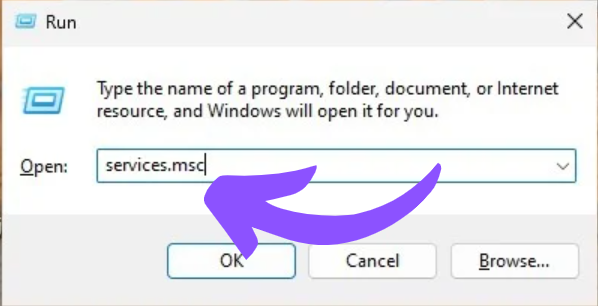
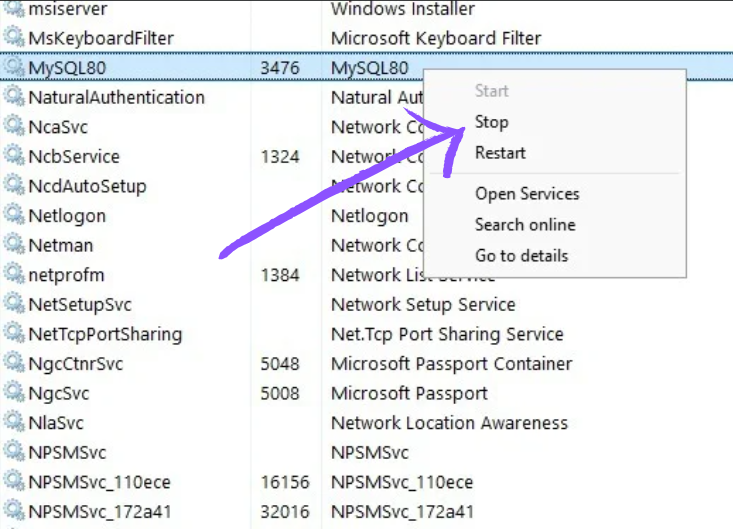
- After this a window will be open, please find MySQL in this list and press right mouse button and stop it.
Create File for Password
1. Open Notepad in on your computer and type this command in Notepad:
ALTER USER 'root'@'localhost' IDENTIFIED BY 'NewPassword';
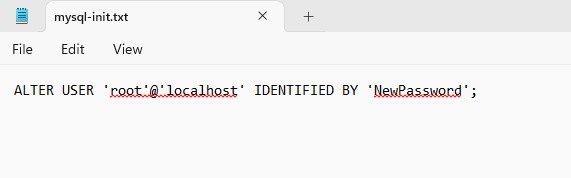
2.After this, save your file in root folder (C directory) and the file name should be mysql-init.txt.

Run Command Prompt
Press Windows key and search cmd and click \*\*Run as administrator.\*\*

Change Password and Restart Server
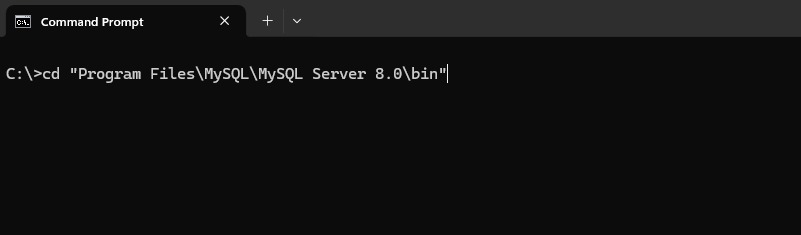
1. Navigate to MySQL directory by typing this command in your command prompt:
cd "Program Files\MySQL\MySQL Server 8.0\bin"
2.After that run this command but double check file path of your system this might be different and use (\) at the place of ():
mysqld --defaults-file="C:\\ProgramData\\MySQL\\MySQL Server 5.7\\my.ini" --init-file=C:\\mysql-init.txt
3,After this restart MySQL server from service list
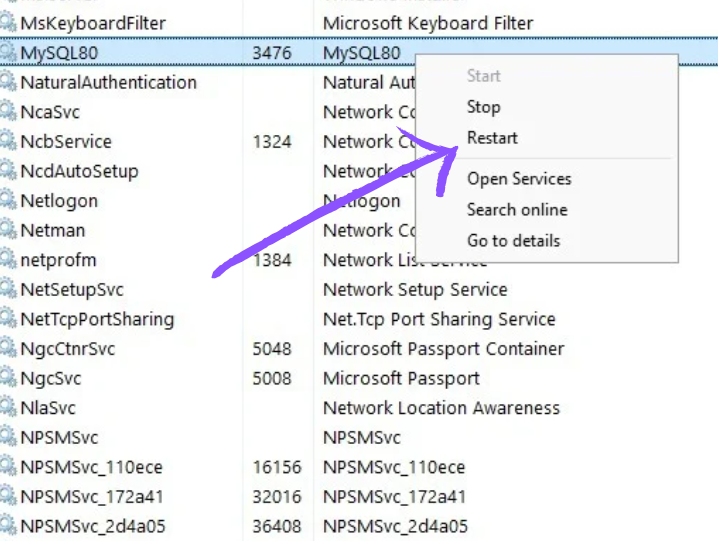
After this, log in your MySQL server with new password.