

Rabikant Singh
Nov 21, 2024
How To Make A Realtime Tic Tac Toe Game Using WebSocket
How to make a tic tac toe game in Piesocket
Let's Create a Vue App
Let's start by creating a Vue app by running the following code in the terminal.
npm create vue@latest
Name your Vue app and configure it however you like.
Then cd into your vue app folder.
cd vue-example-app
Install Dependencies
We need to install some dependencies to run our Vue app.
npm install
We need to install Piesocketjs for our Vue app.
npm i piesocket-js@5
We are using Tailwind for our CSS if you want to install Tailwind into your vue app. you can the instructions here.
Add the given link in head tag of index.html.
<link href="<https://fonts.googleapis.com/css2?family=Material+Icons+Outlined>"
rel="stylesheet">
let player = ref('X')
let board = ref([
    ['', '', ''],
    ['', '', ''],
    ['', '', '']
])
let self = ref('');
let opp = ref('');
let channel;
- theplayer is a reference to the current player, initialized with 'X'.
- board is a reference to the game board, represented as a 3x3 grid of empty strings.
- self and opp are references to the current player and opponent, respectively.
let userId = ref(Date.now().toString());
const handleSubscribe = () => {
var pieSocket = new PieSocket({
clusterId: "YOUR CLUSTER ID",
apiKey: "YOUR API KEY",
notifySelf: true,
presence: true,
userId: userId.value
});
This is our PieSocket configuration .
pieSocket.subscribe("chat-room").then(ch => {
channel = ch;
console.log("Channel is ready")

channel.listen("system:member_joined", function (data) {
console.log("User joined")
if (data.member.user == userId.value) {
self.value = data.member
player.value = 'X'
}
else {
opp.value = data.member;
player.value = 'O'
}
})

channel.listen('play-turn', function (data) {
if (data.player != player.value) {
board.value[data.x][data.y] = data.player;
player.value = player.value === 'X' ? 'O' : 'X'
}
})

channel.listen('play-turn', function (data) {
if (data.player != player.value) {
board.value[data.x][data.y] = data.player;
}
})
})
Subscribing to a Channel
- The snippet begins with pieSocket.subscribe("chat-room").then(ch => { ... }).
- It subscribes to a channel named “chat-room” using the pieSocket object.
- Once the subscription is successful, the callback function inside .then() is executed.
- The channel variable is assigned the value of the subscribed channel (ch).
- Handling Member Join Events:
- Within the channel, there’s an event listener for "system:member_joined".
- When a member joins the chat room, this event is triggered.
- The callback function for this event checks whether the joined member’s user ID matches the value of userId.
- If it does, the self reference is assigned to the joined member, and the player is set to 'X'.
- Otherwise, the opp reference is assigned to the joined member, and the player is set to 'O'.
- Handling Play-Turn Events:
- There are two event listeners for "play-turn" events.
- When a turn is played (presumably in the tic-tac-toe game), this event is triggered.
- The first listener checks if the player making the move is not the current player (data.player != player.value).
- If true, it updates the corresponding cell on the board with the player’s symbol (data.x, data.y, and data.player).
- It also toggles the current player (from 'X' to 'O' or vice versa).
- The second listener (which is identical to the first) updates the board without toggling the player.
const CalculateWinner = (board) => {
const lines = [[0, 1, 2], [3, 4, 5], [6, 7, 8], [0, 3, 6], [1, 4, 7], [2, 5, 8], [0, 4, 8], [2, 4, 6]]
for (let i = 0; i < lines.length; i++) {
const [a, b, c] = lines[i]
if (board[a] && board[a] === board[b] && board[a] === board[c]) {
return board[a]
}
}
return null
}
const winner = computed(() => CalculateWinner(board.value.flat()))
- CalculateWinner Function:
- The CalculateWinner function takes a single argument, board, which is expected to be an array representing the state of a tic-tac-toe board.
- It aims to determine the winner of the game based on the current board configuration.
- The function checks for winning combinations by iterating through an array called lines.
- Each element in lines represents a potential winning line (e.g., three in a row horizontally, vertically, or diagonally).
- For each line, it checks if the values at the specified indices (a, b, and c) on the board match and are not empty.
- If all three values are the same (either 'X' or 'O'), the function returns the winning symbol (either 'X' or 'O').
- If no winner is found, the function returns null.
- winner Computed Property:
- The snippet also defines a computed property called winner.
- This property calculates its value based on the result of invoking the CalculateWinner function on the flattened board (i.e., a 1D array representation of the 3x3 grid).
- The computed function is likely part of a reactive framework (such as Vue.js or similar) and ensures that winner updates automatically whenever the board changes.
const MakeMove = (x, y) => {
if (winner.value) return
if (board.value[x][y]) return
board.value[x][y] = player.value
channel.publish('play-turn', { x, y, player: player.value });
}
const isTie = computed(() => {
return board.value.flat().every(cell => cell !== '') && !winner.value;
});


const ResetGame = () => {
board.value = [
['', '', ''],
['', '', ''],
['', '', '']
]
player.value = 'X'
}
- MakeMove Function:
- The MakeMove function is responsible for handling player moves in the tic-tac-toe game.
- It takes two parameters: x (the row index) and y (the column index) representing the cell where the player wants to make a move.
- Before making a move, it checks the following conditions:
- If there is already a winner (winner.value is truthy), the function returns early (no further moves allowed).
- If the cell at the specified position (board.value[x][y]) is not empty (already occupied), the function also returns early.
- If both conditions are met, the function updates the board by placing the current player’s symbol (player.value) in the specified cell.
- Finally, it publishes a "play-turn" event on the channel with information about the move (coordinates and player).
- isTie Computed Property:
- The isTie computed property checks whether the game is a tie (draw).
- It evaluates to true if all cells on the board are non-empty (not equal to '') and there is no winner (!winner.value).
- If both conditions are met, the game is considered a tie.
- ResetGame Function:
- The ResetGame function resets the game state to its initial state.
- It sets the board back to an empty 3x3 grid.
- Additionally, it sets the current player to 'X'.
<template>
    <main class="pt-8 text-center">
        <h1 class="mb-8 text-6xl font-bold uppercase">Tic Tac Toe</h1>

        <h3 class="text-xl mb-4">Player {{ player }}'s turn</h3>

        <div class="flex flex-col items-center mb-8">
            <div v-for="(row, x) in board" :key="x" class="flex">
                <div v-for="(cell, y) in row" :key="y" @click="MakeMove(x, y)"
                    :class="`border border-white w-24 h-24 hover:bg-gray-700 flex items-center justify-center material-icons-outlined text-4xl cursor-pointer ${cell === 'X' ? 'text-pink-500' : 'text-blue-400'}`">
                    {{ cell === 'X' ? 'close' : cell === 'O' ? 'circle' : '' }}
                </div>
            </div>
        </div>
        <div class="text-center">
            <h2 v-if="winner" class="text-6xl font-bold mb-8">Player '{{ winner }}' wins!</h2>
            <h2 v-else-if="isTie" class="text-6xl font-bold mb-8">It's a tie!</h2>
            <button v-if="winner || isTie" @click="ResetGame"
                class="px-4 py-2 bg-pink-500 rounded uppercase font-bold hover:bg-pink-600 duration-300">Reset</button><br>
        </div>
    </main>
</template>
<style>
body {
    @apply bg-gray-800 text-white;
}
</style>
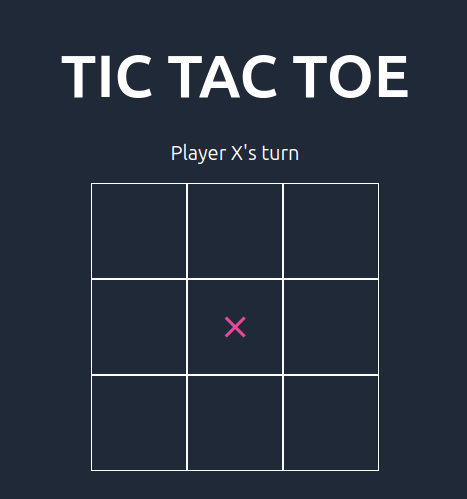
Template: The template section defines the HTML structure of the game. It displays the game board and allows players to make moves by clicking on the board cells. It also displays the winner or a tie message and a reset button when the game ends.
Styles: The style section defines the CSS styles for the game. It uses Tailwind CSS for styling.
This is the complete code:
<script setup>
import { ref, computed, onMounted } from 'vue'
import PieSocket from "piesocket-js";

let player = ref('X')
let board = ref([
    ['', '', ''],
    ['', '', ''],
    ['', '', '']
])
let self = ref('');
let opp = ref('');
let channel;

let userId = ref(Date.now().toString());
const handleSubscribe = () => {
    var pieSocket = new PieSocket({
 clusterId: "YOUR CLUSTER ID",
apiKey: "YOUR API KEY",
        notifySelf: true,
        presence: true,
        userId: userId.value
    });

    pieSocket.subscribe("chat-room").then(ch => {
        channel = ch;
        console.log("Channel is ready")

        channel.listen("system:member_joined", function (data) {
            console.log("User joined")
            if (data.member.user == userId.value) {
                self.value = data.member
                player.value = 'X'
            }
            else {
                opp.value = data.member;
                player.value = 'O'
            }
        })

        channel.listen('play-turn', function (data) {
            if (data.player != player.value) {
                board.value[data.x][data.y] = data.player;
                player.value = player.value === 'X' ? 'O' : 'X'
            }
        })


        channel.listen('play-turn', function (data) {
            if (data.player != player.value) {
                board.value[data.x][data.y] = data.player;
            }
        })
    })
}

onMounted(handleSubscribe);

const CalculateWinner = (board) => {
    const lines = [[0, 1, 2], [3, 4, 5], [6, 7, 8], [0, 3, 6], [1, 4, 7], [2, 5, 8], [0, 4, 8], [2, 4, 6]]
    for (let i = 0; i < lines.length; i++) {
        const [a, b, c] = lines[i]
        if (board[a] && board[a] === board[b] && board[a] === board[c]) {
            return board[a]
        }
    }
    return null
}

const winner = computed(() => CalculateWinner(board.value.flat()))

const MakeMove = (x, y) => {
    if (winner.value) return
    if (board.value[x][y]) return
    board.value[x][y] = player.value
    channel.publish('play-turn', { x, y, player: player.value });
}
const isTie = computed(() => {
    return board.value.flat().every(cell => cell !== '') && !winner.value;
});

const ResetGame = () => {
    board.value = [
        ['', '', ''],
        ['', '', ''],
        ['', '', '']
    ]
    player.value = 'X'
}
</script>

<template>
    <main class="pt-8 text-center">
        <h1 class="mb-8 text-6xl font-bold uppercase">Tic Tac Toe</h1>

        <h3 class="text-xl mb-4">Player {{ player }}'s turn</h3>

        <div class="flex flex-col items-center mb-8">
            <div v-for="(row, x) in board" :key="x" class="flex">
                <div v-for="(cell, y) in row" :key="y" @click="MakeMove(x, y)"
                    :class="`border border-white w-24 h-24 hover:bg-gray-700 flex items-center justify-center material-icons-outlined text-4xl cursor-pointer ${cell === 'X' ? 'text-pink-500' : 'text-blue-400'}`">
                    {{ cell === 'X' ? 'close' : cell === 'O' ? 'circle' : '' }}
                </div>
            </div>
        </div>

        <div class="text-center">
            <h2 v-if="winner" class="text-6xl font-bold mb-8">Player '{{ winner }}' wins!</h2>
            <h2 v-else-if="isTie" class="text-6xl font-bold mb-8">It's a tie!</h2>
            <button v-if="winner || isTie" @click="ResetGame"
                class="px-4 py-2 bg-pink-500 rounded uppercase font-bold hover:bg-pink-600 duration-300">Reset</button><br>
        </div>
    </main>
</template>

<style>
body {
    @apply bg-gray-800 text-white;
}
</style>
Now all you have to do is run the app with the given command.
npm run dev
Complete Code
The project is available on our GitHub : https://github.com/piehostHQ/tic-tac-toe