

kobete
Nov 19, 2024
How to make a rock, paper, scissors game with PieSocket.
Lets learn how to create a rock, paper, scissors game with PieSocket.
Create Vue App
Start by creating a Vue app by running the following code in the terminal.
npm create vue@latest
Give a name to your Vue app.
Then cd into your vue app folder.
cd vue-example-app
Install the dependencies
npm install
We need to install Piesocketjs for our Vue app.
Create an account on piehost.com after that you will be able to create a cluster there and get your api key and cluster id.
npm i piesocket-js@5
We are using ‘Tailwind’ for our CSS if you want to install Tailwind into your Vue app. you can the instructions here.
var channel;
const pieSocket = new PieSocket({
  clusterId: "Your_ClusterId",
  apiKey: "Your_ApiKey",
});
PieSocket is a real-time messaging service. An introduction to this code:
channel — a variable that will hold the channel object of PieSocket, used for both publishing and subscribing messages.
pieSocket: an instance of Piesocket. The clusterId identifies your app’s connection cluster while the apiKey authenticates your application.
const wins = ref(0);
const draws = ref(0);
const losses = ref(0);
const outcomes = {
  rock: {
    rock: "draw",
    paper: "loss",
    scissors: "win",
  },
  paper: {
    rock: "win",
    paper: "draw",
    scissors: "loss",
  },
  scissors: {
    rock: "loss",
    paper: "win",
    scissors: "draw",
  },
The variables "wins," "draws," and "losses" are set to 0 initially as they are reactive references. In Vue.js, the ref() function is used to create reactive reference variables. It is assumed that these variables would keep track of the counts of wins, draws, and losses in games. We create an array called outcomes which maps each option (rock, paper, or scissors) to its result when played against another option. For example, if the player chooses 'rock' and the opponent chooses 'scissors', it results in a win according to the mapping rock: { scissors: "win" }. Each option is therefore related with its likely outcome when matched against any other possible choice for effective gameplay strategy detection.
pieSocket.subscribe("game-room").then((ch) => {
MakeMove = (move) => {
    if (isFirstPlayer === null) {
      isFirstPlayer = true;
      player1Choice.value = move;
      player1MadeChoice.value = true;
      channel.publish("move", JSON.stringify({ move: move, player: "player1" }));
    } else {
      player2Choice.value = move;
      player2MadeChoice.value = true;
      channel.publish("move", JSON.stringify({ move: move, player: "player2" }));
    }
  };
The line pieSocket.subscribe("game-room").then((ch) => {...}) subscribes to a PieSocket channel with the name "game-room". Upon successful subscription, the subscribe method returns a Promise that resolves with the channel object. We use the then method to define the action upon Promise resolution by passing a function that receives the channel object as (ch) parameter. Inside this function, we define MakeMove = (move) => {...} where Move is a parameter for what happens after receiving a player’s move. To detect whether it is the first player making their move in this round or not, within MakeMove we have an if-else condition based on the value of isFirstPlayer: if it's null then set isFirstPlayer to true and assign player1Choice.value to the received move; and player1MadeChoice.value to true. It then publishes the move to the PieSocket channel with a message indicating that the move was made by ‘player1’. If isFirstPlayer is not null, this means that the current player is the second player to make a move in this round. The function then sets player2Choice.value to the move made, and player2MadeChoice.value to true. It then publishes the move to the PieSocket channel with a message indicating that the move was made by ‘player2’.
  channel.listen("move", (move) => {
    if (move) {
      const data = JSON.parse(move);
      if (data.move) {
        if (isFirstPlayer === null) {
          isFirstPlayer = data.player === "player1";
        }
        if (data.player === "player1") {
          player1Choice.value = data.move;
          player1MadeChoice.value = true;
        } else {
          player2Choice.value = data.move;
          player2MadeChoice.value = true;
        }
channel.listen("move", (move) => {...}): This is the line which initializes a listener for “move” events on the PieSocket channel. The function provided will be called with move data when a “move” event is received.
if (move) {...}: If this condition is true, it means that move is defined. In JavaScript, null, undefined, NaN, 0, "" (empty string), and false are all falsy values. So this checks if move has any of these values.
const data = JSON.parse(move);: To gain access to its properties further in the code below, the truthy JSON object string move can be parsed into a JavaScript object using JSON.parse().
if (data.move) {...}: If this conditional statement evaluates to true then it means that there was a valid move that has been received.
if (isFirstPlayer === null) {...}: Whenever isFirstPlayer is null it means we have just had our first round. The client’s next statement either sets isFirstPlayer to true if ‘player1’ made his/her move or assigns it false otherwise. It will determine whether the current client is player one or two in this game session.
if (data.player === "player1") {...} else {...}: This if statement checks if the move was made by ‘player1’. When it does so, player1Choice.value should contain the value given by this specific choice and player1MadeChoice.value evaluates to true. This shows that ‘player1’ has made his/her choice among other options. Otherwise
const outcome = outcomes[player1Choice.value][player2Choice.value];
          console.log(
            `Player 1 chose ${player1Choice.value}, Player 2 chose ${player2Choice.value}`
          );
          if (outcome === "win") {
            console.log("Player 1 Wins");
            wins.value++;
            verdict.value =
              "Player 1 chose " +
              player1Choice.value +
              ", Player 2 chose " +
              player2Choice.value +
              ". Player 1 wins!";
          } else if (outcome === "loss") {
            console.log("Player 2 Wins");
            losses.value++;
            verdict.value =
              "Player 1 chose " +
              player1Choice.value +
              ", Player 2 chose " +
              player2Choice.value +
              ". Player 2 wins!";
          } else {
            console.log("Draw");
            draws.value++;
            verdict.value =
              "Player 1 chose " +
              player1Choice.value +
              ", Player 2 chose " +
              player2Choice.value +
              ". It's a draw!";
          }

          // Broadcast the verdict to both players
          channel.publish(
            "outcome",
            JSON.stringify({ verdict: verdict.value })
          );

          // Update the verdict for the current player
          verdict.value = verdict.value;
outcomes: an object that maps player choices to outcomes (win, loss, or draw) player1Choice and player2Choice: objects that store the choices made by players 1 and 2, respectively wins, losses, and draws: variables that store the number of wins, losses, and draws for player 1 verdict: a variable that stores the outcome of the game as a string channel: an object that seems to be responsible for broadcasting the outcome to both players Logic
The code first determines the outcome of the game by looking up the result in the outcomes object using the choices made by both players.
Then, based on the outcome, it:
Logs a message to the console indicating the winner or draw Increments the corresponding counter (wins, losses, or draws) for player 1 Updates the verdict variable with a string describing the outcome Broadcasts the verdict to both players using the channel object The code then repeats the same logic again, which seems unnecessary and could be refactored to remove the duplication.
Broadcasting the Verdict
The channel.publish method is used to send the verdict to both players. The verdict is JSON-encoded and sent as a string.
Updating the Verdict
The verdict.value is updated twice, which seems unnecessary. The second update could be removed.
channel.listen("outcome", outcome => {
    if (outcome) {
      const data = JSON.parse(outcome);
      if (data.verdict) {
        verdict.value = data.verdict; // Update the verdict ref
      }
      console.log("Verdict received: ", verdict.value);
    } else {
      console.error("Received undefined payload");
    }
  });
Callback function: The callback function takes one argument, outcome, which is the payload received from the channel.
Error handling: If outcome is false (i.e., undefined or null), the code logs an error message to the console: "Received undefined payload".
Processing the outcome payload: If outcome is truthy, the code attempts to parse the payload as JSON using JSON.parse(outcome). If the parsing is successful, the resulting object is stored in the data variable.
Updating the verdict: If the data object has a verdict property, the code updates a Vue ref called verdict with the value of data.verdict. This suggests that verdict is a reactive state variable in the Vue component.
Logging the verdict: Finally, the code logs a message to the console, indicating that a verdict has been received: "Verdict received: " followed by the current value of verdict.
const SaveGame = () => {
  localStorage.setItem("wins", wins.value);
  localStorage.setItem("draws", draws.value);
  localStorage.setItem("losses", losses.value);
};
The JavaScript function called SaveGame performs a certain task. Here's what it does: It stores the current number of wins. localStorage saves data in the browser. It lasts after the browser is closed. The setItem method requires a key and value. Here, the key is "wins" and value is wins.value. It stores the current number of draws. localStorage saves data in the browser. It lasts after the browser is closed. The setItem method requires a key and value. Here, the key is "draws" and value is draws.value. It stores the current number of losses. localStorage saves data in the browser. It lasts after the browser is closed. The setItem method requires a key and value. Here, the key is "losses" and value is losses.value.
const LoadGame = () => {
  wins.value = localStorage.getItem("wins");
  draws.value = localStorage.getItem("draws");
  losses.value = localStorage.getItem("losses");
};
Let's look at a JavaScript function: LoadGame. It has three steps: wins.value = localStorage.getItem("wins"); stores user's tally of triumphs using localStorage. This tool preserves data on the browser, persisting after closure. "wins" fetches that saved value. draws.value = localStorage.getItem("draws"); does the same for ties instead of wins. losses.value = localStorage.getItem("losses"); repeats the process, but for defeats rather than ties or triumphs.
const ResetRound = () => {
  player1Choice.value = null;
  player2Choice.value = null;
};
It is a JavaScript function named ResetRound. Here’s what it does:
player1Choice.value = null; : This line sets the value of player1Choice to null. For example, in games, this might indicate that player 1 would have decided to repeat round he or she was playing.
player2Choice.value = null;: This line stands for the previous one but refers to player 2.
 <main class="container mx-auto p-6 flex-1">
      <div class="flex items-center justify-center -mx-6">
        <button
          @click="MakeMove('rock', 'player1')"
          class="bg-white rounded-full shadow-lg w-64 p-12 mx-6 transition-colors duration-300 hover:bg-pink-500"
        >
          <img src="./assets/RockIcon.svg" alt="Rock" class="w-full" />
        </button>
        <button
          @click="MakeMove('paper')"
          class="bg-white rounded-full shadow-lg w-64 p-12 mx-6 transition-colors duration-300 hover:bg-green-500"
        >
          <img src="./assets/PaperIcon.svg" alt="Paper" />
        </button>
        <button
          @click="MakeMove('scissors')"
          class="bg-white rounded-full shadow-lg w-64 p-12 mx-6 transition-colors duration-300 hover:bg-yellow-500"
        >
          <img src="./assets/ScissorsIcon.svg" alt="Scissors" />
        </button>
      </div>
      <div class="mt-4 text-xl">
        <p>{{ verdict }}</p>
      </div>
    </main>
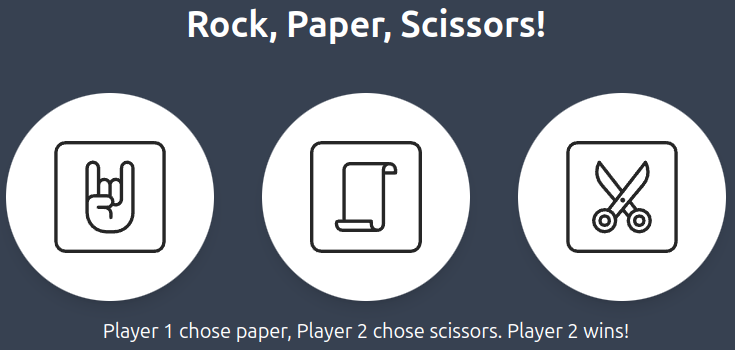
Creating a main container and three buttons, each of which represents one of the three options; Rock, Paper and Scissors. Each button when clicked, has an @click event listener that calls the function named MakeMove, with its corresponding choice as an argument.
Though this snippet does not define the MakeMove function, it most probably modifies the game state hinged on what option the player made and what option the computer had (which was possibly randomly chosen).
Furthermore, each of these buttons has image of either rock, paper or scissors. These images are in a ./assets/ file.
When you hover over them with a mouse pointer, their background will change their color like an effect.
Underneath the buttons is a paragraph showing which gives out information about who won or lost or drew at this stage. This is perhaps a reactive property in the Vue.js component called verdict, updating after every round to show if player won, lost or draw.
Complete code for the game
This is the complete code for our game, you can copy this code and put it into your project:
<script setup>
import { ref, onMounted, reactive } from "vue";
import PieSocket from "piesocket-js";

const wins = ref(0);
const draws = ref(0);
const losses = ref(0);
const outcomes = {
  rock: {
    rock: "draw",
    paper: "loss",
    scissors: "win"
  },
  paper: {
    rock: "win",
    paper: "draw",
    scissors: "loss"
  },
  scissors: {
    rock: "loss",
    paper: "win",
    scissors: "draw"
  }
};
let verdict = ref(null);
let player1MadeChoice = ref(false);
let player2MadeChoice = ref(false);

let MakeMove;

var channel;
const pieSocket = new PieSocket({
  clusterId: "Your_ClusterId",
  apiKey: "Your_ApiKey",
});

let isFirstPlayer = null;
let player1Choice = ref(null);
let player2Choice = ref(null);

pieSocket.subscribe("game-room").then(ch => {
  channel = ch;
  console.log("Channel is ready");

  MakeMove = move => {
    if (isFirstPlayer === null) {
      isFirstPlayer = true;
      player1Choice.value = move;
      player1MadeChoice.value = true;
      channel.publish(
        "move",
        JSON.stringify({ move: move, player: "player1" })
      );
    } else {
      player2Choice.value = move;
      player2MadeChoice.value = true;
      channel.publish(
        "move",
        JSON.stringify({ move: move, player: "player2" })
      );
    }
  };
  channel.listen("move", move => {
    if (move) {
      const data = JSON.parse(move);
      if (data.move) {
        if (isFirstPlayer === null) {
          isFirstPlayer = data.player === "player1";
        }
        if (data.player === "player1") {
          player1Choice.value = data.move;
          player1MadeChoice.value = true;
        } else {
          player2Choice.value = data.move;
          player2MadeChoice.value = true;
        }

        if (player1Choice.value && player2Choice.value) {
          const outcome = outcomes[player1Choice.value][player2Choice.value];
          console.log(
            `Player 1 chose ${player1Choice.value}, Player 2 chose ${player2Choice.value}`
          );
          if (outcome === "win") {
            console.log("Player 1 Wins");
            wins.value++;
            verdict.value =
              "Player 1 chose " +
              player1Choice.value +
              ", Player 2 chose " +
              player2Choice.value +
              ". Player 1 wins!";
          } else if (outcome === "loss") {
            console.log("Player 2 Wins");
            losses.value++;
            verdict.value =
              "Player 1 chose " +
              player1Choice.value +
              ", Player 2 chose " +
              player2Choice.value +
              ". Player 2 wins!";
          } else {
            console.log("Draw");
            draws.value++;
            verdict.value =
              "Player 1 chose " +
              player1Choice.value +
              ", Player 2 chose " +
              player2Choice.value +
              ". It's a draw!";
          }

          // Broadcast the verdict to both players
          channel.publish(
            "outcome",
            JSON.stringify({ verdict: verdict.value })
          );

          // Update the verdict for the current player
          verdict.value = verdict.value;

          // ...
          if (outcome === "win") {
            console.log("Player 1 Wins");
            wins.value++;
            verdict.value =
              "Player 1 chose " +
              player1Choice.value +
              ", Player 2 chose " +
              player2Choice.value +
              ". Player 1 wins!";
          } else if (outcome === "loss") {
            console.log("Player 2 Wins");
            losses.value++;
            verdict.value =
              "Player 1 chose " +
              player1Choice.value +
              ", Player 2 chose " +
              player2Choice.value +
              ". Player 2 wins!";
          } else {
            console.log("Draw");
            draws.value++;
            verdict.value =
              "Player 1 chose " +
              player1Choice.value +
              ", Player 2 chose " +
              player2Choice.value +
              ". It's a draw!";
          }
          channel.publish(
            "outcome",
            JSON.stringify({ verdict: verdict.value })
          );

          verdict.value = verdict.value;

          SaveGame();
          ResetRound();
        }
      }
    } else {
      console.error("Received undefined payload");
    }
  });

  channel.listen("outcome", outcome => {
    if (outcome) {
      const data = JSON.parse(outcome);
      if (data.verdict) {
        verdict.value = data.verdict; // Update the verdict ref
      }
      console.log("Verdict received: ", verdict.value);
    } else {
      console.error("Received undefined payload");
    }
  });
});

const SaveGame = () => {
  localStorage.setItem("wins", wins.value);
  localStorage.setItem("draws", draws.value);
  localStorage.setItem("losses", losses.value);
};

const LoadGame = () => {
  wins.value = localStorage.getItem("wins");
  draws.value = localStorage.getItem("draws");
  losses.value = localStorage.getItem("losses");
};

const ResetRound = () => {
  player1Choice.value = null;
  player2Choice.value = null;
};

onMounted(() => {
  window.addEventListener("keypress", e => {
    if (e.key === "r") {
      ResetRound();
    }
  });
});
</script>
<template>
  <div class="bg-gray-700 text-white text-center min-h-screen flex flex-col">
    <header class="container mx-auto p-6">
      <h1 class="text-4xl font-bold">Rock, Paper, Scissors!</h1>
    </header>
    <main class="container mx-auto p-6 flex-1">
      <div class="flex items-center justify-center -mx-6">
        <button
          @click="MakeMove('rock', 'player1')"
          class="bg-white rounded-full shadow-lg w-64 p-12 mx-6 transition-colors duration-300 hover:bg-pink-500"
        >
          <img src="./assets/RockIcon.svg" alt="Rock" class="w-full" />
        </button>

        <button
          @click="MakeMove('paper')"
          class="bg-white rounded-full shadow-lg w-64 p-12 mx-6 transition-colors duration-300 hover:bg-green-500"
        >
          <img src="./assets/PaperIcon.svg" alt="Paper" />
        </button>
        <button
          @click="MakeMove('scissors')"
          class="bg-white rounded-full shadow-lg w-64 p-12 mx-6 transition-colors duration-300 hover:bg-yellow-500"
        >
          <img src="./assets/ScissorsIcon.svg" alt="Scissors" />
        </button>
      </div>

      <div class="mt-4 text-xl">
        <p>{{ verdict }}</p>
      </div>
    </main>
  </div>
</template>
Now to start the game, just run the given command in terminal:
npm run dev
Complete Code
The project is available on our GitHub : https://github.com/piehostHQ/rock-paper-scissors