


How to add SSH key into a GitHub repository
How to add SSH key into a GitHub repository
Vishal
Mar 9, 2026
About SSH
When you need to authorize the operations on the private repositories in GitHub, you can use SSH keys to ease this process since authorization does not need to rely on the password field. SSH keys enable you to perform push, pull, cloning,, etc. by mapping your GitHub account with the public key corresponding to the private key held on the local computer.
What is an SSH Key?
An SSH key is a cryptographic key pair used to authenticate a user with a remote server. The key pair consists of two parts: a public key and a private key. The public key is uploaded to the remote server—in this case, GitHub—and the private key is stored securely on the user’s local machine. When a connection is initiated, the server verifies the identity of the user by checking the private key against the registered public key. This process is called public-key cryptography and ensures secure, encrypted communication.
How Does SSH Authentication Work?
The SSH authentication process relies on the exchange of cryptographic keys. When you attempt to connect to GitHub, your local machine sends your public key to GitHub. GitHub then challenges your machine to prove ownership of the corresponding private key. If your machine can respond correctly, GitHub grants access. This challenge-response process is seamless to the user but provides robust protection against unauthorized access.
SSH keys used by GitHub are based on the RSA or ED25519 algorithms. RSA keys are widely supported and provide strong security, while ED25519 keys are faster and more secure due to their use of elliptic-curve cryptography.
Managing SSH Keys for GitHub
To maximize security, it’s important to manage SSH keys properly. For instance, private keys should always be stored securely and protected by a passphrase, especially if they are located on a machine that is shared or accessible by multiple users. It is also wise to periodically review and rotate SSH keys, particularly if they have been exposed or compromised in any way.
GitHub allows users to associate multiple SSH keys with their account, enabling the use of different keys for different machines. This is particularly useful for developers who work across various environments, such as personal laptops, desktops, and cloud-based servers. Additionally, if you lose access to a machine, you can revoke that specific key from your GitHub account to prevent unauthorized access.
Why Use SSH Keys for GitHub?
\*\*Security:\*\* Yes, they are more secure than the password because they always involve a pair of cryptographic keys. The encrypted private key resides only on your device, while the public key is tied to your GitHub account, making it more difficult for anybody to get in.
Convenience: SSH key authentication, when set up, lets you work with GitHub repositories without constantly requiring your username and password.
Token Replacement: For HTTPS access to the private repositories, SSH keys (or personal access tokens) became required after GitHub provided basic authentication with passwords.
Tips for SSH Key Security
\*\*Keep Your Private Key Secure:\*\* Do not share your private key or upload to any server or with anyone else. Ensure that the permissions of your key file are such that your user is the only one who can access it (restrict the permission to read only which is 600 as displayed above and shown below: chmod 600 ~/.ssh/id\\\_ed25519).
Use a Strong Passphrase: A passphrase is an additional protection in plain if someone gets hold of your private keys file.
Review and Rotate Keys Regularly: From time to time, check the SSH keys connected to your GitHub account and clear out keys you don’t require. This way, make sure to change keys regularly, particularly if you think that they may have fallen into the wrong hands.
SSH keys come in handy to create a secure and fast way of accessing GitHub's private repositories and make development more secure.
About GitHub
GitHub is a web application that provides Version control and software development environment based on Git technology. Originally a company launched in 2008 and later acquired by Microsoft, GitHub is now a major platform for developers worldwide. Google serves tens of millions of repositories—from individual testing grounds to large-scale business-level initiatives – and is inseparable from open-source cooperation, allowing people and teams to track, store, and share code effectively.
Key Features of GitHub
Version Control with Git: GitHub is constructed from Git, a system of tracking changes in source code created by Linus Torvalds. Git is a system that enables developers to track changes down to the code and make several versions, and roll back to any previous version in the event that one gets ruined. GitHub extends Git with an easy-to-use graphical interface and cloud space to house repositories.
Repositories: Central to GitHub is the idea of repositories, which are essentially folders where files may be kept for a project, which includes code, documentation, and any configuration files. Every repository contains the entire file history of a project with features to track and update changes by using commands like commits, branches, and pull requests. Repositories can be open access, which makes them freely viewable and/or downloadable, or they can be closed, with an authorized number of those who can view or modify their content.
Collaboration Tools: GitHub is particularly good in terms of collaboration because. Pull requests can be used to request changes to a codebase or to suggest code changes, which can then be reviewed by team members before being merged into the master branch. There are items in the GitHub layout that have code reviews, comments, and suggested changes to the code that make it easier to collaborate. This makes it convenient when organizations have several teams, irrespective of whether they’re in the same building or are scattered across the globe.
Issues and Project Management: GitHub includes robust project management tools that help teams organize and track progress. The Issues feature lets users document bugs, request features, or make notes. GitHub also offers project boards similar to Kanban boards, where issues and tasks can be organized into columns, categorized, and assigned to team members. This functionality transforms GitHub from a mere version control platform into a full project management suite.
Actions and CI/CD: GitHub Actions is a tool that automates workflows for tasks like continuous integration and continuous delivery (CI/CD). This feature allows users to set up automated pipelines for building, testing, and deploying their applications directly within GitHub. Predefined and custom actions enable automation, making it easy to set up workflows that reduce manual intervention and increase productivity.
GitHub Pages and Hosting: GitHub Pages is a feature that allows users to host static websites directly from their repositories. This is particularly popular for personal blogs, project documentation, and portfolio sites. Users can create websites with custom domains, and GitHub automatically deploys changes, providing a simple and free hosting solution.
Community and Open Source: GitHub has played a pivotal role in the growth of the open-source community. With a vast ecosystem of public repositories, GitHub enables developers to share their work with others, contribute to open-source projects, and learn from other projects. Users can “fork” repositories to make their own copies, contribute via pull requests, and collaborate on open-source projects of any scale.
Integration and API: GitHub integrates with numerous tools and services, such as Slack, Trello, and various IDEs, making it easy to incorporate GitHub into different workflows. Additionally, GitHub’s API allows developers to automate and interact with the platform programmatically, supporting advanced integrations and custom tools.
GitHub's Impact and Ecosystem
Thanks to GitHub’s environment, developers and contributors have engaged in the creation of stable ecosystems, which positively impact all sectors of software development. GitHub makes it easy for teams ranging from small companies and start-ups to larger corporations to develop software effectively through a supply of tools for version control, collaboration, project planning, automation amongst others. For that, it became the backbone of the open-source culture as well as the workflow of developers involved in creating new applications.
Generate your SSH Key
First, open the terminal on your system If you are using Ubuntu, press ctrl + alt + t.
After that, type this command in your terminal
ssh-keygen -t ed25519 -N "" -f /tmp/pvt_ed25519
Replace this file name as you wish and press Enter.
And your key will be ready to use
Get SSH ID
After generating SSH, we need to get it so we can use it:
cat /tmp/pvt_ed25519.pub
You will get your output:
ssh-ed25519 AAAAC3NzaC1lZDI1NTE5AAAAIDv2aGmtHacKTtbzwai0L6nm+MWVae3TpQrzygo7cLcNB thor@Thor
Remember, Your Output will be different this output will not work for you.
Create a private Repositories
Before Adding the key, we need to create a private repository so let's do it
- Click on your profile icon > click on your repositories

- Click on New and a window will open fill it like this:
Test it
Very first, create private repositories on GitHub
- Click on your profile Icon and then click on Your repositories option

Your repositories page will be open. Click on the New button and a new page will appear
Fill it like this
Repository name: Give a name to your repository
Choose the Private option to keep your repositories private
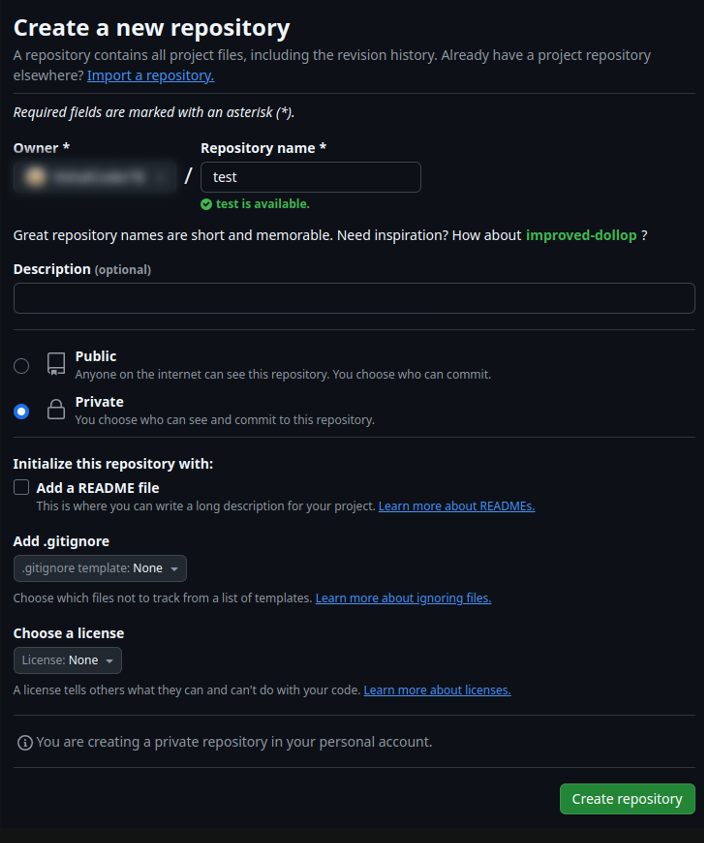
Our private repositories are ready to add SSH.
Add SSH to Repositories
Open your repositories in GitHub and follow This step
- Go to Setting
- Click on Deploy keys

A window will appear Fill it like this
- Title: Give any name of your key so you can easily discover it when you need it
- Key: Put your key here, which we created.
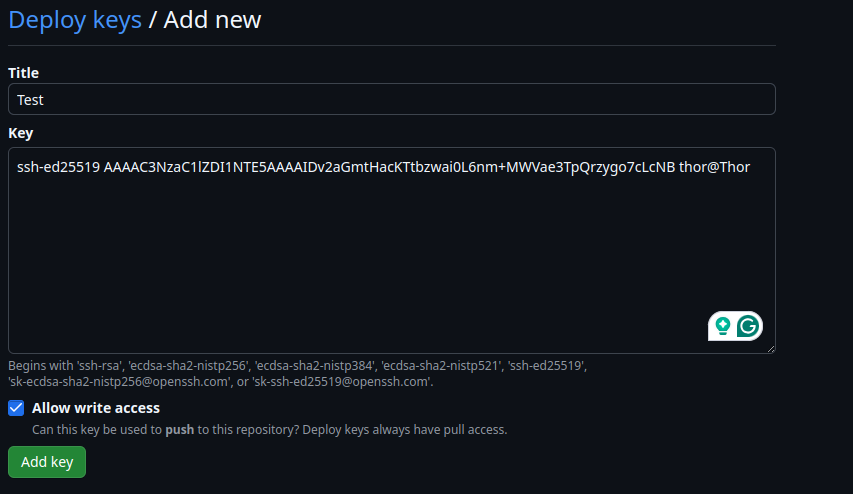
And now we are ready to use it